


Remote work is no longer a temporary operating model. In fact, distributed teams now power customer support, operations, finance, recruiting, and product execution for thousands of growing companies. That shift is exactly why remote team management tools 2026 have become a priority for leaders who need better visibility, faster communication, and consistent performance across locations.
Table of Contents
- What Are Remote Team Management Tools 2026?
- How Remote Team Management Tools 2026 Work
- Key Benefits of Remote Team Management Tools 2026
- Step-by-Step Guide to Choosing Your Stack
- Best Tools and Resources for Distributed Teams
- Common Mistakes to Avoid
- Advanced Tips and Strategies
- Frequently Asked Questions
- Next Steps for Your Team
If you are scaling a remote or hybrid team, the right tool stack does more than organize tasks. It reduces management drag, gives you cleaner accountability, and helps you build a team that feels in-house instead of fragmented. In this guide, you will learn what remote team management tools 2026 really include, how they work, which categories matter most, and how to choose a setup that supports long-term growth.
What Are Remote Team Management Tools 2026?
Remote team management tools 2026 are the systems you use to coordinate work, communication, documentation, performance, and team operations when people work across locations. In other words, these tools form the infrastructure that keeps your distributed team aligned without forcing you to manage every detail manually.
However, this category is broader than chat or project management software alone. A complete remote team management tools 2026 stack often includes communication platforms, task tracking, documentation hubs, scheduling systems, reporting dashboards, and people operations support. When those systems work together, you spend less time chasing updates and more time improving output.
That matters because remote teams create a different management challenge than office-based teams. According to Gallup and other workplace research, clarity, manager communication, and role expectations strongly affect engagement and performance. Therefore, if your team is distributed, your tools need to create structure that an office environment used to provide by default.
How Remote Team Management Tools 2026 Work
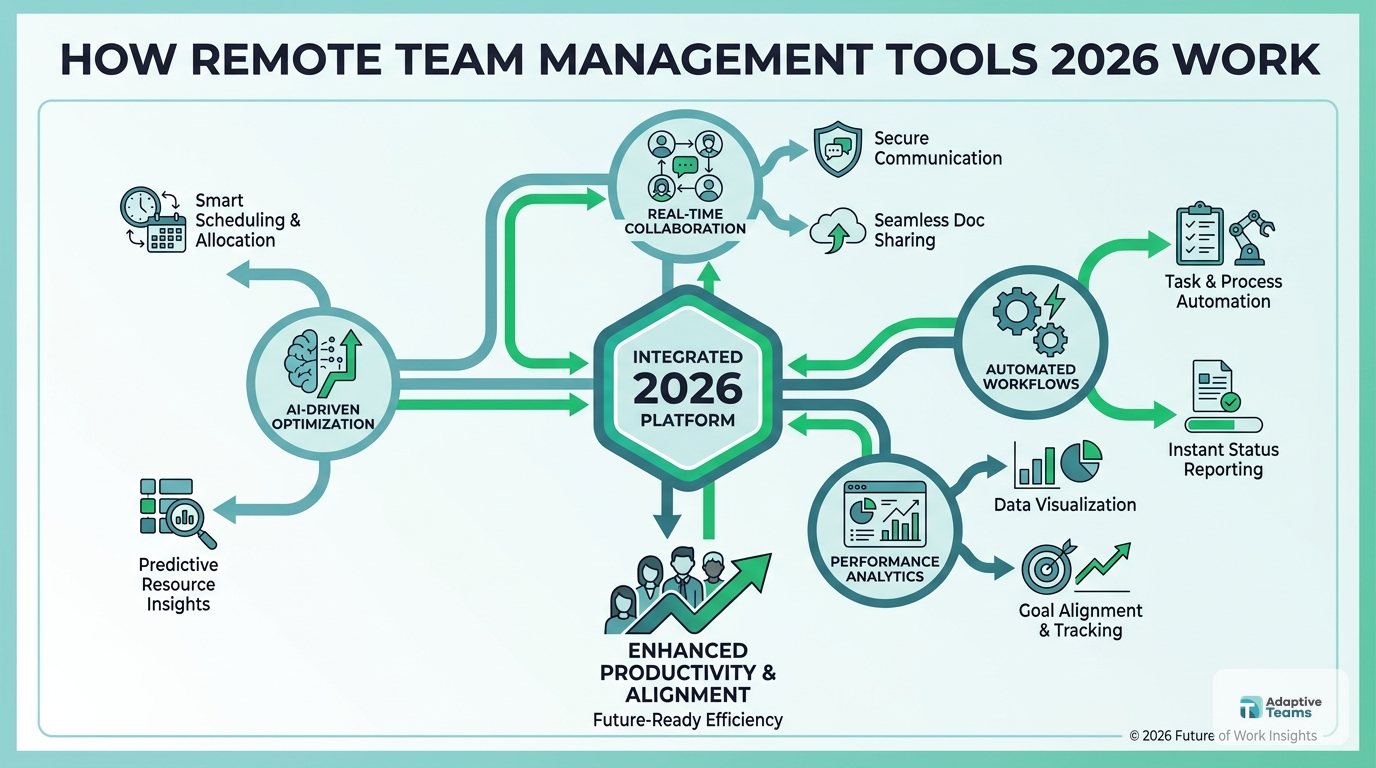
The best remote team management tools 2026 do not work as isolated apps. Instead, they create a connected operating system for your team.
1. They centralize communication
First, your team needs one primary place for daily communication. This reduces scattered updates across email, texts, and ad hoc calls. As a result, decisions become easier to trace and managers spend less time repeating instructions.
2. They track work in a visible workflow
Next, task and project tools turn vague assignments into visible progress. You can see what is planned, what is blocked, and who owns each deliverable. Consequently, execution improves because your team does not rely on memory alone.
3. They document repeatable knowledge
Furthermore, documentation tools store processes, playbooks, and role expectations. That is critical when you are onboarding remote staff or standardizing cross-functional work. Without documentation, remote teams often slow down because answers stay trapped in meetings.
4. They support accountability through data
Additionally, reporting and performance dashboards help you review outcomes instead of relying on activity theater. For example, you can track response times, completion rates, hiring velocity, or customer service KPIs depending on the function.
5. They create operational rhythm
Finally, remote team management tools 2026 support recurring rhythms like weekly planning, one-on-ones, performance reviews, and onboarding checklists. In practice, that rhythm is what turns remote work from reactive coordination into a repeatable system.
Key Benefits of Remote Team Management Tools 2026
When you choose the right remote team management tools 2026, the gain is not just convenience. The real gain is lower operational drag.
Better visibility across teams
- You can see priorities, deadlines, and blockers in one place.
- Therefore, managers make faster decisions with less follow-up.
Faster onboarding
- New hires ramp faster when training materials, workflows, and role expectations live in documented systems.
- In many teams, this can cut early confusion by weeks.
Stronger accountability
- Clear ownership and due dates reduce ambiguity.
- As a result, performance conversations become objective instead of emotional.
Lower founder and manager bandwidth drain
- Leaders spend less time chasing updates or manually coordinating work.
- That frees capacity for growth, hiring, and strategic planning.
More consistent execution across time zones
- Async-friendly systems help work continue without waiting for live meetings.
- This is especially valuable if your team spans multiple regions.
Better retention and team experience
- People perform better when expectations are clear and communication is structured.
- According to research from Microsoft and Gallup, clarity and connection both influence employee effectiveness in distributed work settings.
Easier scaling
- Once your systems are documented, you can add people without rebuilding your management model each time.
- That is a major advantage for companies growing from 10 to 100 employees.
Step-by-Step Guide to Choosing Your Stack
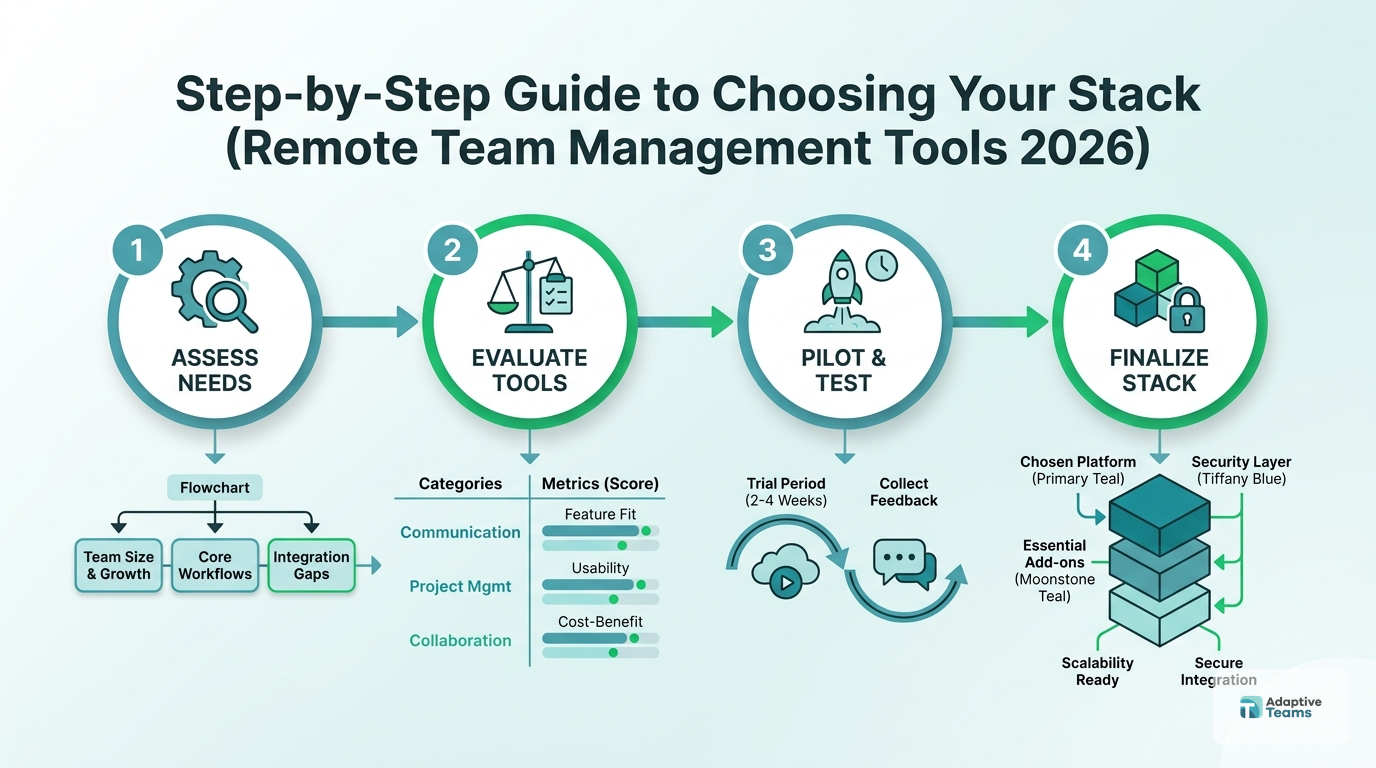
If you are evaluating remote team management tools 2026, start with the operating problem you need to solve. Do not start with a list of trendy apps.
Step 1: Map your management bottlenecks
First, identify where coordination breaks today. For example, you may have unclear ownership, delayed updates, poor onboarding, or weak documentation. Once you know the friction points, tool selection becomes much easier.
Step 2: Separate communication from workflow
Next, define which tool handles conversation and which tool handles execution. Many teams fail because they manage tasks inside chat threads. While chat is useful, it should not replace project tracking.
Step 3: Standardize your documentation layer
Then, create one source of truth for processes, policies, and role-specific playbooks. This is essential if you want remote team management tools 2026 to improve speed instead of adding more noise.
Step 4: Define the metrics that matter
After that, decide what performance should look like. That could mean project delivery speed, response times, recruitment cycle time, error rate, or customer satisfaction. If you cannot define outcomes, your tools will default to measuring shallow activity.
Step 5: Build weekly operating rhythms
Additionally, set recurring rhythms around planning, reporting, and one-on-ones. Tools only help when they support a cadence your team actually follows.
Step 6: Audit integrations before rollout
Furthermore, check whether your communication, project, calendar, and HR systems integrate cleanly. Every broken handoff creates extra admin work, and that compounds quickly as headcount grows.
Step 7: Keep the stack lean
In contrast, do not add a new platform for every minor problem. A lean stack usually performs better because adoption stays high and training stays manageable.
Step 8: Pilot with one team first
Finally, test the system with one function or department before a company-wide rollout. This gives you real adoption feedback and helps you fix weak processes early.
Build a Remote Team That Runs Smoothly
Get practical guidance on staffing, structure, and performance systems for your distributed team.
Best Tools and Resources for Distributed Teams
The best remote team management tools 2026 usually span a few essential categories rather than one all-in-one product.
Project and workflow management
Tools like Asana, ClickUp, and Monday.com help you assign owners, set deadlines, and track delivery. These are useful when you need clear accountability across departments.
Communication and async updates
Platforms like Slack and Microsoft Teams centralize communication. However, they work best when paired with clear channel rules and documented follow-up processes.
Documentation and knowledge management
Resources such as Notion or Confluence help you store SOPs, onboarding guides, and meeting notes. Consequently, your team becomes less dependent on live explanations.
Scheduling and coordination
Calendar systems, shift planners, and meeting scheduling tools reduce timezone friction. This is particularly helpful for support, operations, and cross-functional leadership work.
Staffing and team infrastructure support
If your bottleneck is not just management but hiring and people operations, a remote staffing partner with HR and performance support can solve more than software alone. offshore staffing solutions
Common Mistakes to Avoid
Many teams buy remote team management tools 2026 and still see poor execution. Usually, the issue is not the software. It is the operating model around it.
Mistake 1: Using chat as your project system
When tasks live only in messages, ownership disappears fast. As a result, deadlines slip and managers end up re-asking for the same updates.
Mistake 2: Adding too many tools at once
More software does not equal more control. In fact, tool sprawl often creates duplicate work, lower adoption, and fragmented data.
Mistake 3: Failing to document repeatable work
If your team depends on verbal instructions, remote scaling gets harder with every new hire. Therefore, undocumented processes become a hidden tax on growth.
Mistake 4: Measuring activity instead of outcomes
Time online is not the same as progress. If you reward visible busyness instead of real results, you create mistrust and weak performance signals.
Mistake 5: Ignoring people operations
Even strong software cannot fix weak onboarding, poor manager follow-up, or unclear role design. Ultimately, remote team management tools 2026 work best when paired with real people systems.
Advanced Tips and Strategies
Once the basics are in place, you can get more value from remote team management tools 2026 by improving how the system is used.
Build role-based dashboards
First, create dashboards by function rather than one giant company view. Operations, recruiting, finance, and support teams need different signals. This makes reporting easier to use and act on.
Design for async by default
Additionally, assume not everyone will be online at the same time. Use structured updates, recorded walkthroughs, and documented decisions so work keeps moving without meeting overload.
Tie tools to performance reviews
Furthermore, connect documented goals, scorecards, and weekly reporting to your review process. This gives team members a clearer picture of how performance is measured.
Use onboarding as a systems test
Every new hire reveals where your operating system is weak. For example, if onboarding requires constant manual explanation, your documentation and workflow automation tools need improvement.
Combine staffing support with management infrastructure
In many growing companies, software alone is not enough. If you are hiring quickly, pairing the right tools with structured recruiting, payroll, compliance, and performance oversight via outsourced HR services creates a stronger long-term result.
Frequently Asked Questions
What are the most important remote team management tools 2026?
The most important remote team management tools 2026 usually include communication software, project tracking, documentation systems, scheduling tools, and performance reporting. The exact mix depends on your team size, function, and growth stage.
How many remote team management tools should a growing company use?
Most growing companies should keep the core stack lean. In many cases, 3 to 5 well-integrated systems are enough to manage communication, workflow, documentation, and reporting without creating tool sprawl.
Are remote team management tools 2026 enough on their own?
No. Remote team management tools 2026 support execution, but they do not replace clear role design, manager follow-up, onboarding systems, or hiring support. Tools work best when paired with strong operating processes.
What should you look for when comparing remote team management tools 2026?
You should look for adoption ease, workflow visibility, integration quality, documentation support, reporting capability, and how well the tool fits your actual management bottlenecks. A simpler tool with better adoption often outperforms a feature-heavy one.
Can remote team management tools 2026 help with offshore teams?
Yes. These tools are especially useful for offshore and distributed teams because they improve visibility, support async work, and reduce location-based coordination gaps. However, they are most effective when paired with strong onboarding and performance management.
What is the biggest mistake companies make with remote team management tools 2026?
The biggest mistake is expecting software to solve unclear management. If ownership, documentation, and review rhythms are weak, even expensive tools will produce messy results.
Next Steps for Your Team
The best remote team management tools 2026 do not win because they have the longest feature list. They win because they reduce friction, improve accountability, and help your team operate with less confusion. Therefore, your first move should be to identify the management bottleneck that costs you the most time today.
From there, build a lean system around communication, workflow, documentation, and performance. If you also need help hiring and supporting the people inside that system, Adaptive Teams can help you design a remote team structure that scales. Book a free staffing consultation at https://adaptiveteams.co/services/ and build a distributed team that performs like an in-house operation.
Ready to Build Your Dream Team?
Book a free staffing consultation with our remote team specialists. No obligations, just actionable insights for scaling your operations.
Related reading: Benefits of Offshore Teams.