



Hiring a personal assistant for private individuals remote is not usually about wanting help with a few errands. It is about private life turning into an operations job: scheduling, travel, household admin, vendor follow-up, inbox noise, renewals, research, and decisions that keep stealing attention from higher-value work.
Table of Contents
- What a remote personal assistant can actually handle
- The tasks to delegate first
- What should stay local or tightly controlled
- The privacy question is operational
- How to design the role before hiring
- What to look for in candidates
- The first 30 days
- How to measure whether the hire is working
- Common mistakes that make remote assistants expensive
- FAQ
The right remote personal assistant can give time back without putting another person inside your home every day. The wrong hire can create more coordination work, privacy risk, and rework than the tasks were worth in the first place.
That is the real decision. You are not just choosing between in-person and virtual help. You are deciding which parts of your personal operating system can be handled remotely, which parts require local presence, and what structure protects your time, data, family preferences, and standards.
What a remote personal assistant can actually handle
A remote personal assistant works best when the task depends on judgment, coordination, and follow-through rather than physical presence.
Common responsibilities include calendar management, appointment scheduling, travel planning, restaurant and event research, gift sourcing, subscription management, household vendor coordination, document organization, online purchases, inbox triage, bill reminders, and recurring admin.
For a founder, executive, investor, or family office principal, the value is not only task completion. It is reducing the number of open loops you personally carry. A good assistant does not just book the dentist. They notice that the annual checkup, insurance renewal, car service, school forms, and passport expiration all live in the same month and build a cleaner plan.
That kind of work can be remote because the asset is not proximity. The asset is trusted operational attention.
The role starts to break down when you expect one remote assistant to replace a house manager, driver, nanny, local errand runner, and executive assistant at the same time. Physical work needs physical coverage. Remote work needs clean delegation, secure access, and a repeatable communication rhythm.
The tasks to delegate first
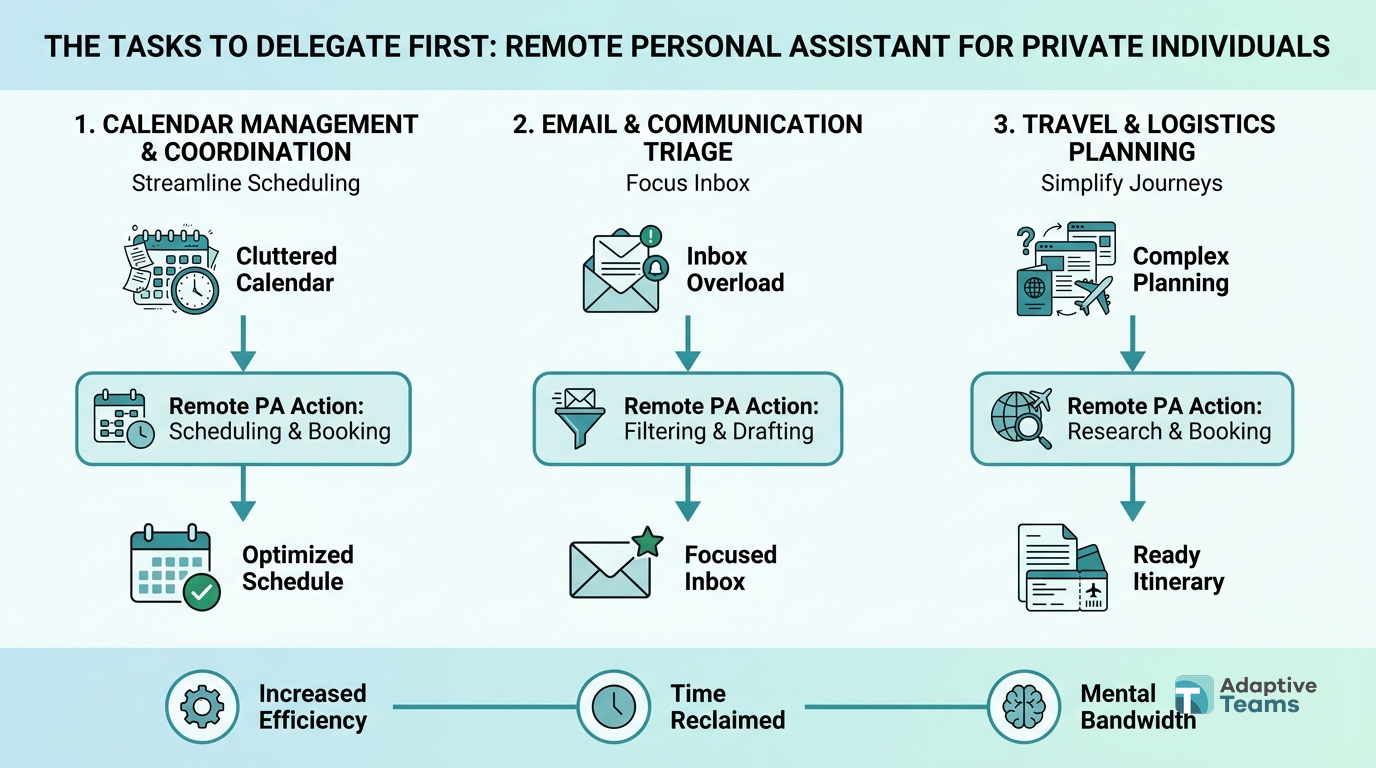
Start with work that is frequent, low-risk, and easy to define. You want the assistant to build context before they touch anything sensitive or highly personal.
Calendar and appointment control
Most private individuals underestimate how much time goes into scheduling. A remote assistant can coordinate medical appointments, personal meetings, family logistics, travel windows, service visits, and reminders.
The best setup is not “manage my calendar.” It is a written set of rules: preferred appointment times, buffer rules, no-meeting blocks, travel constraints, family priorities, and escalation triggers.
If you travel frequently, the assistant should also understand your normal airport, seat preferences, hotel standards, loyalty programs, visa reminders, and backup options. A documented travel profile saves dozens of repeat decisions.
Inbox and document sorting
Remote assistants can reduce inbox load without answering everything as you. They can label messages, pull out renewals, summarize threads, flag decisions, archive noise, and prepare draft responses for approval.
This is especially useful for private admin: insurance notices, property management emails, school communication, household vendor updates, event invitations, invoices, and receipts.
The same applies to documents. A remote assistant can maintain folders, name files consistently, collect tax records, chase missing paperwork, and prepare summaries for your accountant or advisor.
Vendor and household coordination
Many household tasks are coordination problems, not physical tasks. A remote assistant can request quotes, compare vendors, confirm availability, schedule service windows, collect invoices, and follow up after the work.
For example, replacing a broken appliance may require researching models, checking warranties, contacting repair vendors, comparing delivery windows, confirming building access, and updating the household calendar. Only the final physical appointment requires someone local.
Research and decision support
A strong assistant can narrow choices before they reach you. That might mean researching a vacation rental, comparing school holiday camps, finding a specialist doctor, screening local storage options, checking restaurant availability, or preparing a short list of gift ideas.
The key is to define what “good” means before the research starts. Budget, location, timing, preferences, deal breakers, and decision format all matter.
What should stay local or tightly controlled
Remote support has limits. Naming those limits early prevents disappointment and protects trust.
Anything requiring physical presence should stay with local support: errands, home access, package handling, on-site supervision, pet care, driving, childcare, and in-person event setup.
Some tasks can be remote but need tighter controls. Financial transfers, medical information, legal documents, identity documents, and access to private family information should move slowly. Use staged permissions, approval workflows, and clear records.
The IRS guidance on household employees is a useful reminder that private help can create obligations depending on the working relationship and local rules. The details vary by country, but the principle is consistent: the structure matters.
This is why private individuals should avoid casual hiring for high-trust roles. A friendly referral or low-cost marketplace profile is not enough when the person may see travel patterns, family schedules, invoices, personal preferences, and household routines.
The privacy question is operational
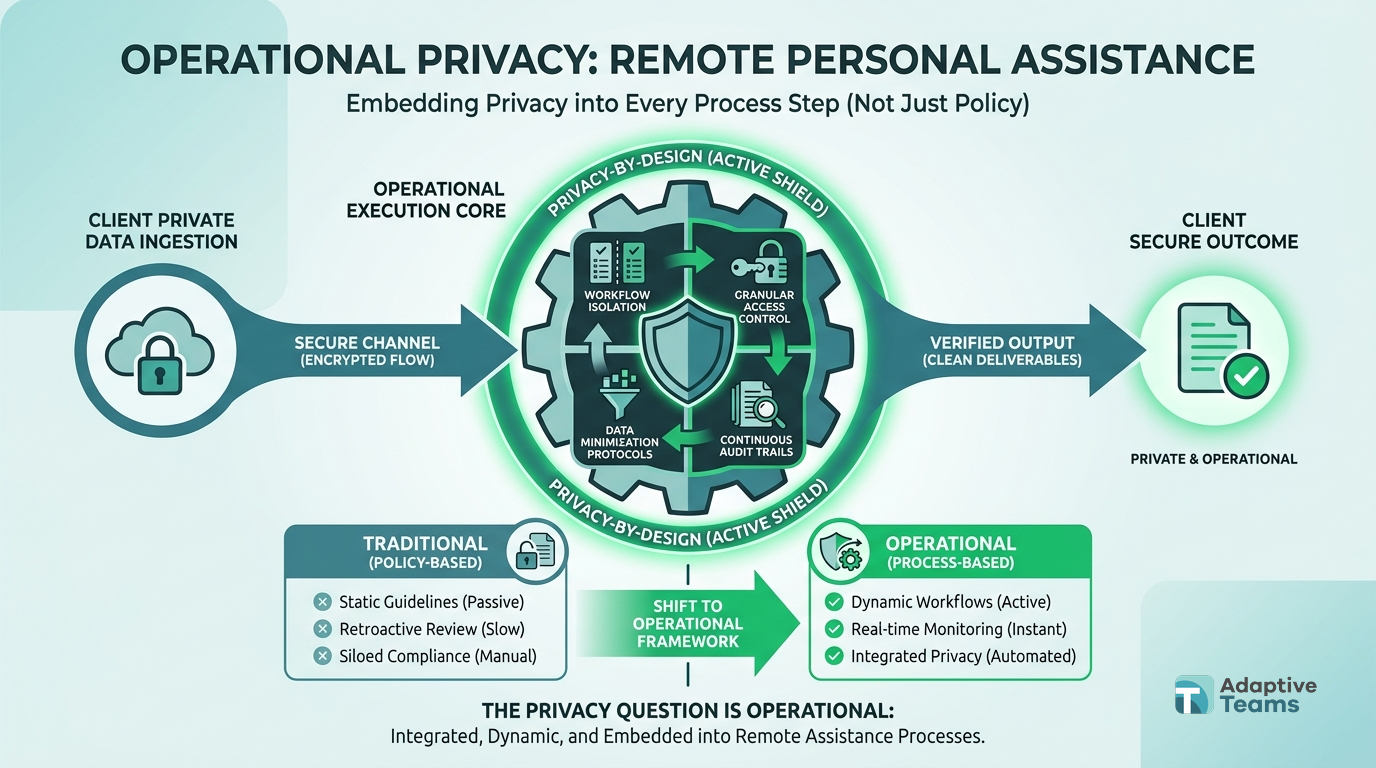
Trust matters, but trust alone is not a system.
Before hiring, decide what the assistant can access on day 1, what requires approval, and what is never delegated. Use password management, multi-factor authentication, separate user accounts where possible, and shared inbox rules that avoid exposing unnecessary history.
For sensitive work, create a permission ladder.
Day 1 might include read-only calendar visibility, approved vendor contacts, and access to a task board. After 30 days, the assistant may gain limited inbox access or travel booking access. Financial and medical access should only be added if the role truly requires it and the process has clear approval checkpoints.
The goal is not to make the role slow. The goal is to avoid giving broad access before the working relationship has earned it.
The same thinking applies in company settings. When operators build distributed teams, they get better results by defining access, ownership, and escalation early. Adaptive Teams covers this broader structure in its guide to building a remote team from scratch, and the principle holds for private support: clarity protects output.
Get Personal Admin Off Your Plate
Adaptive Teams can help you hire dedicated remote support with recruiting, onboarding, payroll, and performance follow-up built in.
How to design the role before hiring
The strongest remote personal assistant roles start with a weekly workload map, not a job post.
List every recurring personal admin task that consumes your time. Then sort each task into 4 groups:
- Remote from day 1
- Remote after trust is built
- Local only
- Not worth delegating
That last category matters. Some tasks take longer to explain than to do. A remote assistant should remove repeatable drag, not turn every small decision into a briefing exercise.
Once the work is mapped, estimate time by category. A private individual may only need 15 to 20 hours per week at first. A family office principal, frequent traveler, or founder with multiple properties may need a full-time assistant or a blended model with both remote and local support.
The U.S. Bureau of Labor Statistics data on employer costs is a useful benchmark when comparing direct employment with managed support. Salary is only one part of the real cost. Recruiting time, benefits, payroll, administration, replacement risk, and management overhead all belong in the comparison.
If you need long-term help, the hiring model should also match the relationship. Contractor models can work for limited scopes. Employee or managed staffing models can fit better when the assistant is embedded into your daily life and expected to stay. Adaptive Teams supports both contractor and employee models, tailored to the role, country, and compliance profile. compliant remote staffing structures
What to look for in candidates
The best candidate is not always the person with the longest assistant resume. Private support requires discretion, judgment, written clarity, follow-through, and the ability to anticipate without overstepping.
Screen for specific behaviors.
Ask candidates how they would handle conflicting appointments, a vague travel request, a vendor who misses a service window, or a private message they are unsure whether to answer. Their process matters more than a polished claim that they are organized.
Give a practical work sample. Ask them to plan a 3-day family trip within a budget, summarize 10 sample emails into decisions and actions, or compare 3 vendors using your criteria. Look for accuracy, clean formatting, sensible assumptions, and clear questions.
Remote fit also matters. The person needs to communicate without constant prompting, document decisions, and maintain momentum across time zones. Our guide to how to interview remote candidates for real team fit explains how to test those habits before making a hire.
For private assistant roles, reference checks should focus on trust and operating style. Did the person protect confidential information? Did they follow through without being chased? Did they ask smart clarification questions? Did they handle mistakes directly?
The first 30 days
A remote personal assistant should not be dropped into a messy inbox and expected to figure out your life.
Start with a controlled ramp.
Week 1: context and rules
Share the household or personal admin map, calendar rules, preferred vendors, travel preferences, naming conventions, communication channels, and approval boundaries. Give examples of completed tasks so the standard is visible.
Week 2: simple recurring work
Assign appointment scheduling, document sorting, vendor follow-up, and research tasks. Keep the scope narrow enough to review quickly.
Week 3: ownership of repeatable workflows
Move recurring responsibilities into the assistant’s hands: weekly calendar cleanup, monthly subscription review, travel profile maintenance, or vendor tracker updates.
Week 4: review and expand
Review what saved time, what created friction, and what should remain with you. Expand access only where the assistant has shown reliability.
Strong onboarding turns a private assistant from “helpful person” into a reliable system. The same discipline applies to larger teams, which is why remote onboarding best practices focus on examples, feedback loops, and clear ownership.
How to measure whether the hire is working
Do not measure the role by how busy the assistant seems. Measure whether your attention is coming back.
Useful signals include fewer personal admin tasks sitting in your head, faster vendor follow-up, cleaner travel planning, fewer missed renewals, shorter email review sessions, and fewer reminders needed from you.
Track a simple weekly scorecard:
- Tasks completed without rework
- Decisions prepared for approval
- Hours of your time saved
- Missed or delayed follow-ups
- New SOPs created
- Sensitive tasks handled correctly
If the assistant needs constant clarification after 60 days, diagnose the system before replacing the person. The issue may be unclear preferences, too many exceptions, weak examples, or tasks that should never have been delegated remotely.
If the person is accurate but waiting too often, they may need clearer authority. If they move fast but make avoidable errors, permissions may have expanded too quickly. performance management for remote personal support
Common mistakes that make remote assistants expensive
The first mistake is hiring before defining the work. A vague role creates vague output.
The second is giving full access too early. Convenience is not worth exposing sensitive information before trust and controls are in place.
The third is expecting one person to handle every personal, household, family, and business task. Separate private support from executive support when the volume or sensitivity justifies it.
The fourth is treating the assistant like a temporary task taker. If you want long-term leverage, build role context, give feedback, and let the assistant own recurring workflows.
The fifth is choosing the lowest hourly rate without pricing your own management time. A low-cost hire who needs constant correction is not low-cost. The SHRM research on human capital benchmarking points to a broader truth operators already feel: hiring and turnover costs are real even when they do not sit neatly on one invoice.
This is similar to the broader tradeoff in virtual assistant vs remote employee. Short-term task help and embedded remote support are different models. Choose based on the operating outcome you need.
FAQ
Can a remote personal assistant handle private household tasks?
Yes, if the task is mostly coordination, research, scheduling, document handling, or follow-up. Physical errands, home supervision, childcare, driving, and package handling still need local support.
How many hours per week should I hire for?
Start with the recurring workload. Many private individuals begin with 15 to 20 hours per week, then expand if the assistant takes ownership of travel, household coordination, inbox management, and vendor follow-up.
Should a personal assistant be a contractor or employee?
It depends on scope, country, control level, schedule, and long-term expectations. Contractor and employee models can both work when structured correctly. The important step is matching the model to the real working relationship.
What information should I give a remote assistant first?
Start with low-risk context: calendar preferences, approved vendors, travel preferences, task lists, and communication rules. Add inbox, financial, medical, or identity-related access only after trust and controls are established.
How do I know if the assistant is saving enough time?
Look for fewer open loops, fewer reminders, faster follow-up, cleaner scheduling, and less time spent on personal admin. If your week feels lighter and decisions reach you better prepared, the role is working.
Where to start
A remote personal assistant can be a practical way to remove private admin without hiring full-time local help for every task. The leverage comes from matching the role to remote-friendly work, building privacy controls, and hiring someone who can own recurring workflows over time.
Start by writing the 20 tasks you no longer want to carry. Mark which ones are remote-ready, which need trust first, and which require local support. That map will tell you whether you need a part-time assistant, a full-time embedded hire, or a blended model.
If you want help finding a remote assistant who can operate with discretion, structure, and long-term follow-through, Adaptive Teams can support the search through recruitment services for dedicated remote team members and managed staffing infrastructure.
Ready to Build Your Dream Team?
Book a free staffing consultation with our remote team specialists. No obligations, just actionable insights for scaling your operations.