

TL;DR
Good remote onboarding is a 30-day plan with checkpoints at 60 and 90 days, not a welcome email and a Slack invite. Set up equipment and accounts before day one, assign a peer buddy who checks in daily for two weeks, and give a small real task by day three. Move from daily to weekly check-ins as the hire starts contributing, and track time to first real contribution and 90-day retention.
Remote onboarding best practices separate teams that scale smoothly from teams that lose people in the first 90 days. Getting it wrong is expensive. Gallup estimates that replacing an employee costs one-half to two times that person's annual salary. And only 12% of employees strongly agree that their organization does a great job of onboarding, according to Gallup's onboarding research.
Yet most remote onboarding is still an afterthought. A welcome email, a Slack invite and a Zoom call with HR. Then the new hire is left to work out the rest alone. That is not a system. It is a risk.
This guide lays out what works: a structured 30-day framework that gets new team members productive quickly and builds the connection that keeps them engaged for the long run.
Why Remote Onboarding Fails (And What It Costs You)
The signs of broken remote onboarding show up fast. New hires sit in meetings they do not understand. They wait days for access to key tools. They finish compliance training with no idea who to ask for help. By week three they are updating their LinkedIn profile.
The root causes are predictable.
No clear owner. HR thinks the hiring manager is handling it. The hiring manager thinks HR has it covered. Nobody owns the experience. Gallup's research puts the manager at the center of onboarding, and that is where most programs fall short.
Information scattered across tools. The handbook lives in Notion. The IT setup guide is in a Google Doc. The benefits portal needs a separate login nobody mentioned. New hires waste hours hunting for basics.
Culture by osmosis does not work remotely. In an office, new hires pick up norms by watching how people talk, when they take breaks and how conflicts get settled. Remote workers get none of this unless you build it into onboarding on purpose.
The 30-60-90 day plan is a fantasy. Most plans are documents written once and never opened again. They list goals but give no path to reach them.
The cost is not just turnover. It is a hire who takes six months to contribute instead of six weeks. It is damage to team morale when new members struggle in public. And it is the reputation hit when former employees tell their networks your company is disorganized.
The Pre-Start Phase: Set the Stage Before Day One
Good remote onboarding starts before the new hire logs in. The days between offer acceptance and start date set the tone for everything after.
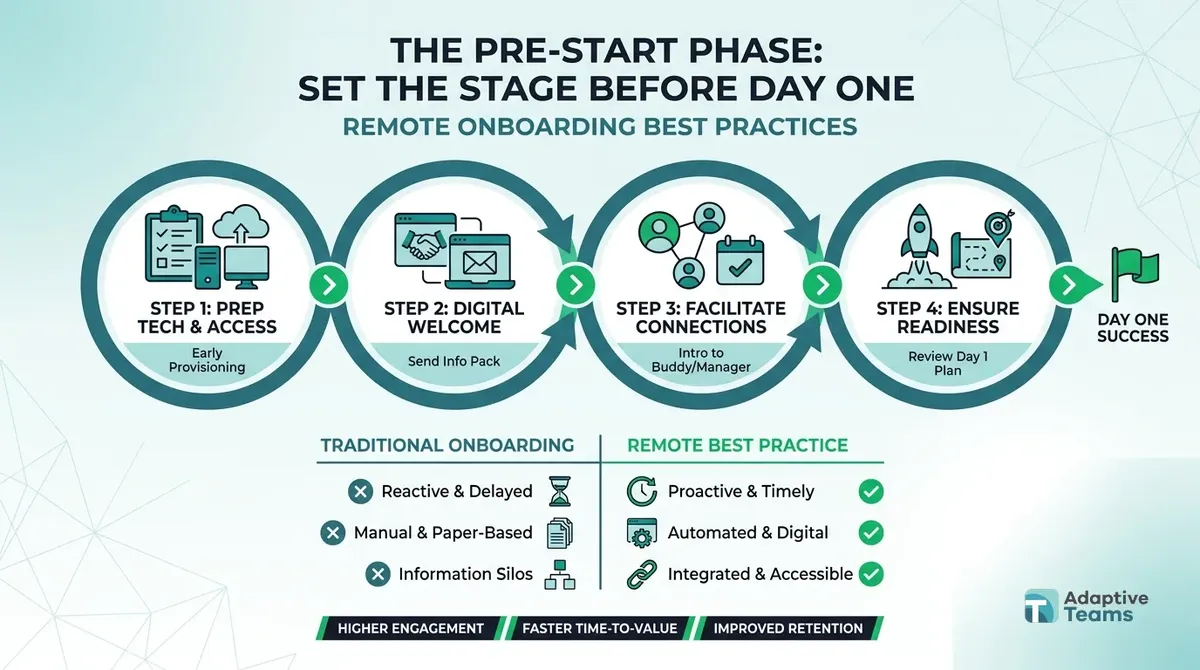
Ship or confirm hardware early. If the role needs specific equipment, it should arrive at least two days before the start date. Include setup instructions written for non-technical people, and test everything before it ships. If the hire uses their own laptop, confirm the specs and internet speed in advance. Nothing says "we did not plan this" like a first morning spent fixing a laptop that will not connect.
Create accounts in advance. Set up email, Slack, project tools and any role-specific software before day one. Send logins securely, with clear steps for two-factor authentication. Day one should start with work, not with waiting for access.
Send a welcome pack. This is not about branded swag. Include an org chart with photos and names, a handbook that explains how decisions get made, and a first-week schedule with meeting links, attendee names and the purpose of each meeting. Add contact details for IT support, HR and the direct manager.
Assign a buddy. Not the manager. Ideally not someone in the same department. A peer who can answer the questions new hires are afraid to ask: "Is it normal to have this many meetings?" "Do people here use Slack or email for that?" The buddy checks in daily for the first two weeks, then weekly through month one.
Share the first-week schedule. Ambiguity creates anxiety. Send a detailed calendar: welcome call with the manager, IT setup, HR paperwork, team introductions and project overviews. Include blocks for independent work and exploration. New hires should know what happens when, not wonder if they are missing something.
Week One: Structure, Connection, and Clarity
The first week is about reducing uncertainty and building relationships. New hires need to know what success looks like and who can help them get there.
Day one is for people, not paperwork. Start with a video call with the direct manager. Not a status update. A real conversation about what the team is working on, what success looks like in the role and how the manager likes to communicate. Follow with introductions to immediate teammates. Use video for every meeting this week. Faces build trust faster than avatars.
Finish admin by day two. Contracts, payroll details, compliance training: batch them into set time blocks and get them done. Do not spread them across the week. Every hour spent on forms is an hour not spent learning the actual work.
Give one source of truth. Create a Notion page, Confluence space or shared folder with everything: org chart, tool logins, team processes, project documents and communication norms. Keep it current. When a new hire asks a question, add the answer to this page.
Hold daily check-ins. Fifteen minutes with the manager every day for the first week. Same time, same format: what did you learn, what is unclear, what do you need. These are not status reports. They catch confusion early.
Assign a small, real task by day three. Not busywork. Something that helps the team but is low risk if done imperfectly: a documentation review, a competitor scan, a fix in a non-critical system. Early wins build confidence and show the hire their work matters.
Weeks Two to Four: Building Autonomy and Contribution
After week one, shift from hand-holding to guided independence. The goal is a new hire who knows enough to ask good questions and is doing real work.
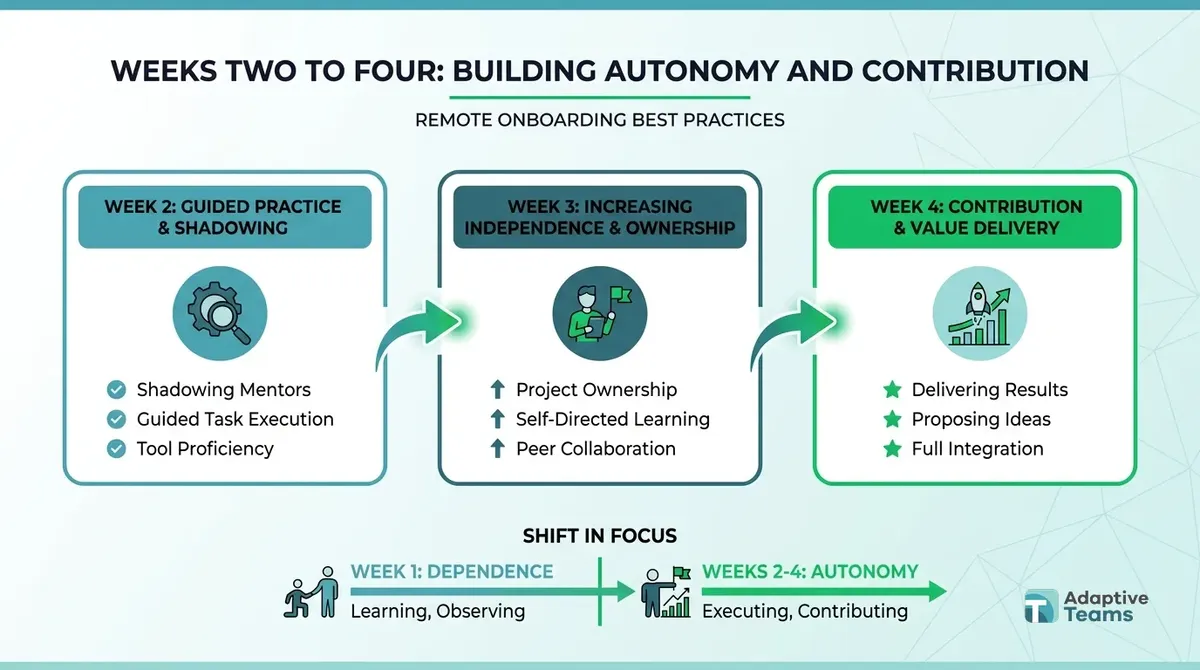
Introduce the 30-60-90 day plan properly. Week one is for learning. Weeks two to four are for doing. Month two is for improving. Month three is for owning. Write the plan with the new hire, not for them. It should reflect what they need to learn and what they want to achieve.
Use shadowing and reverse shadowing. Have the new hire watch experienced teammates in meetings, client calls or code reviews. Then reverse it: the new hire leads while the experienced person watches and gives feedback. Skills transfer faster this way than through any document.
Hold weekly 1:1s with clear agendas. Move from daily check-ins to weekly structured talks. Review progress against the plan. Discuss blockers. Give specific feedback on finished work. Ask how they are fitting into the team.
Connect across departments. Remote workers can get stuck in their own team. Schedule introductions with key people in finance, operations, product and sales. People who understand how the whole business works make better contributors.
Write down what the new hire learns. Ask them to note what they figured out, what was confusing and what they wish they had known sooner. This becomes your onboarding playbook. The newest hire often sees most clearly what is broken.
The Tools That Actually Matter
Tool overload is a real problem. Remote onboarding fails when new hires spend their first week working out which app to use for what. Be deliberate about your stack. Our guide to remote team management tools covers the options in more depth.
One communication hub. Pick Slack, Teams or Discord and make it the default. Meeting invites, document links and announcements all live there. If something important happens in email, copy it to the hub. New hires should not have to check six channels to know what is going on.
One project management source of truth. Asana, Monday, Linear or Jira: choose one and stick to it. Every task, deadline and handoff lives there. When a new hire asks what to work on, the answer is always in the same place.
One documentation platform. Notion, Confluence or a well-organized Google Drive. Processes, decisions, contact lists and how-tos all live here. The test: can a new hire answer a basic question without asking anyone?
One video standard. Zoom, Meet or Teams. Everyone uses the same one. Links are consistent. Recording and transcription are on by default for important sessions. New hires should never need a new app to join a meeting.
HR and payroll automation. Use a dedicated platform for contracts, payroll and equipment requests. Manual steps create delays and errors. At Adaptive Teams, payroll runs through Deel twice a month, on the 15th and the 30th, so new hires know from day one when and how they get paid.
Common Mistakes That Undermine Remote Onboarding
Even well-meant remote onboarding programs fail when they fall into these traps.
Treating remote onboarding as office onboarding over video. It is not the same. Remote onboarding needs more structure, more documentation and more deliberate relationship building. Hallway chats do not happen through a screen.
Overloading the first week. Ten hours of video calls a day is not onboarding. It is exhaustion. New hires need time to process information, explore tools and work alone. Balance structured sessions with open time.
Forgetting about time zones. If your team spans continents, do not schedule all onboarding in one time zone's business hours. Record sessions for later viewing. Write summaries. Build a system that works for everyone, not just headquarters. Our guide to remote team time zone management shows how to set overlap hours.
Ignoring the household. Remote work happens at home. A new hire's partner or family may not understand the boundaries of the new role. A short note on working hours and what to expect can help.
Stopping after month one. Onboarding is not a 30-day program. It runs 90 days with checkpoints at 30, 60 and 90. The first month is about getting started. Months two and three are about mastery and fit.
No feedback loop. If you do not survey new hires at 30, 60 and 90 days, you are guessing. Ask specific questions: What was confusing? What took too long? What would have helped? Then act on the answers.
Skipping compliance basics. Contracts, worker classification and local labor rules belong in the pre-start phase, not as a fix later. Our HR compliance checklist for remote teams lists what to cover.
Measuring Remote Onboarding Success
You cannot improve what you do not measure. Track these numbers to know if your onboarding works.
Time to first real contribution. How long until the new hire ships something that matters? Not a training exercise. Real work the team depends on. A fair target for most roles is within two weeks.
30, 60 and 90 day retention. What share of new hires are still with you at each checkpoint? If people leave in the first 90 days, onboarding is part of the problem.
New hire Net Promoter Score. Survey at 30 and 90 days: "How likely are you to recommend this company to a friend looking for work?" Use a 0 to 10 scale. Following the Net Promoter scoring method, subtract the percentage answering 0 to 6 from the percentage answering 9 or 10; answers of 7 or 8 are passives. Track the trend across hires rather than chasing one target number.
Manager confidence. Ask the hiring manager at 30, 60 and 90 days: "How confident are you that this hire will succeed?" Falling confidence is an early warning.
Time to full productivity. When does the new hire no longer need much guidance on core work? This varies by role, but set a target and track against it. Formal reviews keep this honest. At Adaptive Teams every placement gets a dedicated manager and performance reviews twice a year.
Where to Start If Your Remote Onboarding Needs Work
Pick one thing to fix this week. Not everything. One thing.
If new hires are confused about tools, build a single documentation hub. If they feel isolated, assign buddies and add 1:1s. If they stay unproductive for months, rewrite your 30-60-90 day plan with clearer milestones.
Onboarding also starts earlier than most teams think. A hire who was screened for the real work settles in faster, so tighten your process for interviewing remote candidates too.
If you are building or scaling a remote team and want onboarding handled as part of a full staffing service, Adaptive Teams recruits, onboards, pays and manages remote team members for you through our HR outsourcing service. If a hire does not work out in the first 2 months, we replace them at no cost. For the wider case for building abroad, see the benefits of offshore teams.
The companies that win with remote work are not the ones with the best tools or perks. They are the ones that treat onboarding as part of how they run the business. Start there.
Frequently asked questions
How long should remote onboarding take?
The structured phase should last 30 days, with checkpoints at 60 and 90 days. Full integration usually takes three to six months, depending on how complex the role is. The first 30 days set the foundation, so if that period is weak, the rest will struggle.
What is the most common remote onboarding mistake?
Assuming new hires will figure it out. Remote workers cannot watch and absorb culture the way office workers can, so everything has to be written down, explained and reinforced. The second most common mistake is too little manager involvement. HR cannot onboard someone alone.
Should remote onboarding be synchronous or asynchronous?
Both. The first week should be mostly live: video calls, real-time introductions and quick feedback. After that, shift toward async work: recorded training, documentation and independent work with scheduled check-ins. The goal is guided independence, not abandonment.
How do you onboard remote workers in different time zones?
Record important sessions so people can watch them later. Rotate live session times so no one time zone always takes the late slot. Write detailed documentation that removes the need for real-time answers, and build relationships through planned 1:1s, not just group calls.
What should be in a remote onboarding checklist?
Hardware shipped or confirmed, accounts set up, welcome pack sent, buddy assigned, first-week calendar shared, documentation hub ready, 30-60-90 day plan drafted, contracts and payroll details done, team introductions booked, first real task picked and manager time blocked for daily check-ins.
How do you build culture during remote onboarding?
On purpose. Culture is not a side effect of a shared office. It comes from consistent behavior: how people communicate, how decisions get made, how conflict is handled and how wins are marked. Write these norms down, talk about them openly and model them in every interaction.

Written by the people who recruit, pay and manage remote teams every day, with Nate Ginsburg and Menno Gottmer. About Adaptive Teams